date: “2016-12-01” draft: false title: “Windows Auditing”
Windows Auditing
Useful Links
| Title | Link | Description |
|---|---|---|
| Advanced Security Audit Policy Settings | technet | Provides information about the Advanced Audit policy settings that are available in Windows operating systems and the audit events that they generate |
| Audit Policy | technet | Has a section for category / subcategory description |
| Windows Security Log Events | ultimate windows security | Lookup Event Types |
Registry Information
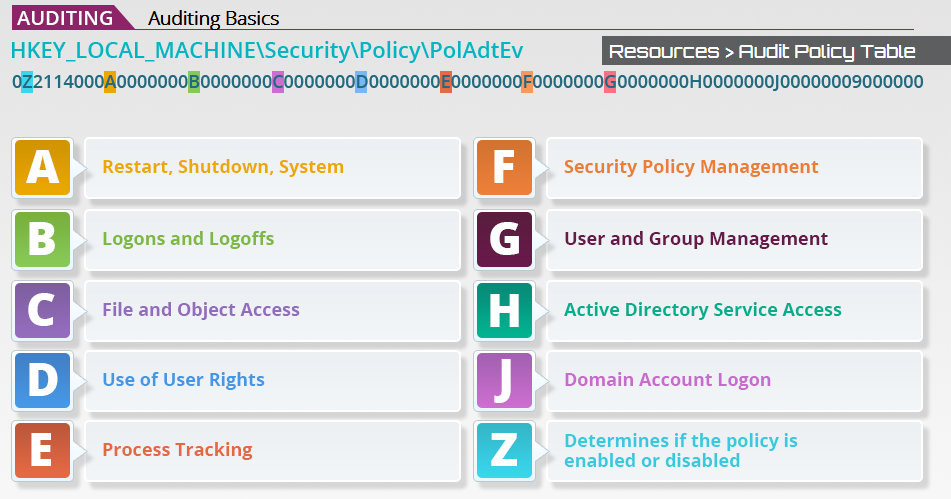
| Value for A-G | Meaning |
|---|---|
1 |
Success Auditing is enabled |
2 |
Failure Auditing is enabled |
3 |
Both Succes and Failure are enabled |
| Value for Z | Meaning |
|---|---|
0 |
Policy is disabled |
1 |
Policy is enabled |
NOTE: You can have an audit policy (such as Audit Successful and Failed Logon Attempts), but have it disabled. You may also have an enabled audit policy that audits nothing.
Auditable Event Categories
| Category | Description |
|---|---|
| System | User restarts or shuts down the computer. Additionally, audits events that affect system security or the security log. |
| Logon | User logs on or off the local computer. This also audits attempts to make a network connection |
| Object Access | User gains access to a file folder or printer, or any other securable object |
| Privilege Use | User exercises a right such as taking ownership of a file, or attempts to |
| Detail Tracking | Application performs an action such as program activation, some forms of handle duplication, indirect access to an object,and process exit. |
| Policy Change | Change is made to the user security options, user rights, or Audit policies |
| Account Management | Administrator creates, changes, or deletes a user account or group. Also, audits password changes. |
| Directory Service Access | User gains access to an Active Directory object |
| Account Logon | Domain controller receives a request to validate a user account. Additionally audits logon attempts by privileged accounts that log on to the domain controller. These events are generated when the Kerberos Key Distribution Center (KDC) logs on to the domain controller. |
Event Types (msdn)
| Event type | Description |
|---|---|
| Error | An event that indicates a significant problem such as loss of data or loss of functionality. For example, if a service fails to load during startup, an Error event is logged. |
| Warning | An event that is not necessarily significant, but may indicate a possible future problem. For example, when disk space is low, a Warning event is logged. If an application can recover from an event without loss of functionality or data, it can generally classify the event as a Warning event. |
| Information | An event that describes the successful operation of an application, driver, or service. For example, when a network driver loads successfully, it may be appropriate to log an Information event. Note that it is generally inappropriate for a desktop application to log an event each time it starts. |
| Success Audit | An event that records an audited security access attempt that is successful. For example, a user’s successful attempt to log on to the system is logged as a Success Audit event. |
| Failure Audit | An event that records an audited security access attempt that fails. For example, if a user tries to access a network drive and fails, the attempt is logged as a Failure Audit event. |
Event ID’s
Tools
The following tools can be used to edit audit policies or view event logs:
| Tool | Description |
|---|---|
AuditPol.exe |
A command line tool, native to Windows, to enable, disable, and change audit policy. |
EventQuery.vbs |
A built-in tool used to query and view Windows event logs. EventQuery has multiple options to filter queries and enables an administrator to list the events and event properties from one or more event logs. |
PSLogList.exe |
A tool that allows you to login to remote systems in situations your current set of security credentials |
wevtutil.exe |
(Windows 7+) Windows Events Command Line Utility. Enables you to retrieve information about event logs and publishers, install and uninstall event manifests, run queries, and export, archive, and clear logs. |
AuditPol.exe
AuditPol is a command line tool, native to Windows, to enable, disable, and change audit policy
Get an Audit Status Overview
Just run AuditPol
C:\>AuditPol
Running ...

(0) Audit Disabled

AuditCategorySystem            = No
AuditCategoryLogon             = No
AuditCategoryObjectAccess      = No
AuditCategoryPrivilegeUse      = No
AuditCategoryDetailedTracking  = No
AuditCategoryPolicyChange      = No
AuditCategoryAccountManagement = No
Unknown                        = No
Unknown
For a description of these catigories, go to the Win32 api, of course. MSDN
User Auditing Information
# Who is being audited?
AuditPol /List /User
# How?
AuditPol /Get /User:UserName /Category:*
# What's the user's SID?
AuditPol /List /User /V
Find the Category / Subcategory names
To know what to get/set you’re going to need to know the Category/Subcategory name. The following command clearly lists all of the available options.
# Get all top level categories
AuditPol /List / Category
# Need the GUID to search for the registry entry?
AuditPol /List /Category /V

# List all subcategories
auditpol /list /subcategory:*
# List a specific category
auditpol /list /subcategory:"Privilege Use"
Use either of the TechNet links above to find more information about a Category/Subcategory.
Get
This section just lists out some acceptable syntax. It was taken from the help output of the command.
auditpol /get /user:domain\user /Category:"Detailed Tracking","Object Access"
auditpol /get /Subcategory:{0cce9212-69ae-11d9-bed3-505054503030} /r
auditpol /get /option:CrashOnAuditFail
auditpol /get /user:{S-1-5-21-397123417-1234567} /Category:"System"
auditpol /get /sd
Set
This section just lists out some acceptable syntax. It was taken from the help output of the command.
auditpol /set /user:domain\user /Category:"System" /success:enable /include
auditpol /set /subcategory:{0cce9212-69ae-11d9-bed3-505054503030} /failure:disable
auditpol /set /option:CrashOnAuditFail /value:enable
auditpol /set /sd:D:(A;;DCSWRPDTRC;;;BA)(A;;DCSWRPDTRC;;;SY)
Examples
# Setting a bunch of policies
auditpol /set /subcategory:"IPsec Driver" /success:disable /failure:disable
auditpol /set /subcategory:"Account Lockout" /success:disable /failure:disable
auditpol /set /subcategory:"Registry" /success:enable /failure:enable
auditpol /set /subcategory:"Kernel Object" /success:enable
auditpol /set /subcategory:"Process Termination" /success:enable /failure:enable
auditpol /set /subcategory:"Audit Policy Change" /success:enable /failure:enable
auditpol /set /subcategory:"Directory Service Changes" /success:enable
auditpol /set /subcategory:"Kerberos Service Ticket Operations" /success:enable
Categories can be comma separated:
auditpol /set /Category:"System,Privilege Use" /success:enable
PSLogList.exe
Get the last 10 lines of the system log:
psloglist -n 10 system
psloglist -s -t "\t" -n 20 Security | findstr /n /i "<FILTER>"
wevtutil.exe (technet)
This command is only available on Windows 7+.
wevtutil COMMAND [ARGUMENT [ARGUMENT] ...] [/OPTION:VALUE [/OPTION:VALUE] ...]
Commands
| Short Name | Long Name | Description |
|---|---|---|
el |
enum-logs |
List log names. |
gl |
get-log |
Get log configuration information. |
sl |
set-log |
Modify configuration of a log. |
ep |
enum-publishers |
List event publishers. |
gp |
get-publisher |
Get publisher configuration information. |
im |
install-manifest |
Install event publishers and logs from manifest. |
um |
uninstall-manifest |
Uninstall event publishers and logs from manifest. |
qe |
query-events |
Query events from a log or log file. |
gli |
get-log-info |
Get log status information. |
epl |
export-log |
Export a log. |
al |
archive-log |
Archive an exported log. |
cl |
clear-log |
Clear a log. |
Get help on a specific command:
wevtutil COMMAND /?
# Example
wevtutil gl /?
# Or
wevtutil get-log /?
Get the last 10 lines of the system log:
# Query Events in the System log, return 10, most recent first, in text format
wevtutil qe System /c:10 /rd:true /f:text
Get a list of all the log files
webtutil el